Yes, the Gemini Developer API has a Free Tier—but “free” is a property of a specific endpoint, project, feature, and moment in time. It is not a blanket promise for every Gemini model.
As of August 31, 2026, Google's pricing page showed free standard input and output for selected Flash, Pro, live audio, speech, embedding, and robotics endpoints. Your usable quota can still differ: Google applies limits per project, may give preview models tighter capacity, and directs developers to Google AI Studio for the limits active on their project.
If you only need a safe starting rule, use this one:
“Pick a free endpoint that matches the workload, prefer a stable lifecycle label for production, and confirm the selected project's live limits in AI Studio before building around it.
The short answer: which Gemini API models are free?
The following endpoint IDs had free-of-charge standard input and output in Google's pricing table when checked on August 31, 2026:
| Workload family | Endpoints shown with free standard input and output |
|---|---|
| General Flash | gemini-3.7-flash, gemini-3.6-flash, gemini-3.5-flash, gemini-3-flash-preview, gemini-2.5-flash |
| Lightweight Flash | gemini-3.5-flash-lite, gemini-3.1-flash-lite, gemini-2.5-flash-lite |
| Pro | gemini-2.5-pro |
| Live and native audio | gemini-3.5-live-translate-preview, gemini-3.5-transcribe-live, gemini-3.1-flash-live-preview, gemini-2.5-flash-native-audio-preview-12-2025 |
| Transcription and speech | gemini-3.5-transcribe, gemini-3.1-flash-tts-preview, gemini-2.5-flash-preview-tts |
| Embeddings | gemini-embedding-001 |
| Robotics | gemini-robotics-er-2-preview, gemini-robotics-er-2-streaming-preview, gemini-robotics-er-1.6-preview |
This is a dated pricing snapshot, not a guarantee that every endpoint is enabled for your account. It also does not mean every mode, tool, or feature attached to an endpoint is free.
Google's pricing page also presented Gemini Embedding 2 as a free offering, but its callable endpoint ID could not be reconciled consistently with the model catalog at the time of review. Check the live catalog before using it; do not guess the identifier. gemini-embedding-001 was separately documented with free input.
Choose by workload, not by the longest model list
A static list answers “what appeared free?” but not “what should I use?” A better selection process narrows the free candidates first, then checks lifecycle and project availability.
| If you are building… | Start your comparison here | Check before committing |
|---|---|---|
| A general text or multimodal prototype | The currently listed Flash endpoints | Whether the exact endpoint is enabled and marked stable, preview, or experimental |
| A latency- or volume-sensitive experiment | The Flash Lite endpoints | Output quality on your real prompts and the project's token/request limits |
| A reasoning-heavy proof of concept | gemini-2.5-pro | Whether its available free quota is enough for your prompt and output sizes |
| Live translation or transcription | The matching live/translate/transcribe endpoint | Preview status and any additional audio or concurrency limits |
| Text-to-speech | A listed TTS preview endpoint | Preview lifecycle, supported behavior, and non-token feature charges |
| Semantic search or retrieval | gemini-embedding-001 | Input limits, vector dimensions, and the exact endpoint shown in the current catalog |
| Robotics research | The matching robotics endpoint | Preview availability, hardware/workflow fit, and project-specific access |
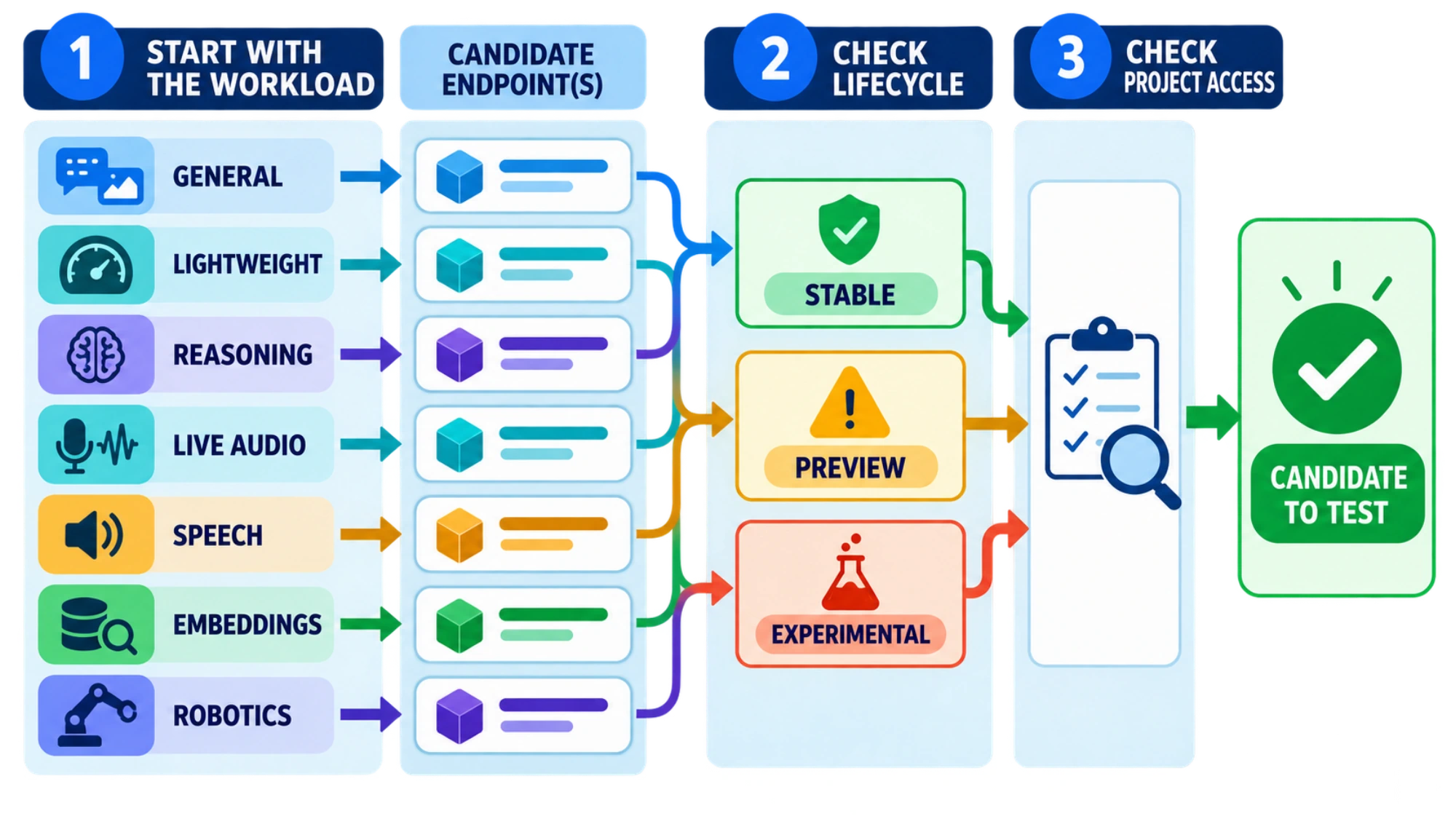
Do not equate a newer version number with a safer production choice. Google's model catalog distinguishes stable, preview, experimental, latest, and deprecated names. Preview and experimental endpoints can change or retire sooner and can have more restrictive limits. For production, check the current lifecycle label and use a specific stable model when one fits; a latest alias is convenient for exploration but can make behavior changes harder to control.
Models that were not free for standard API input and output
On the same date, Google's Standard pricing rows showed free-tier input and output as unavailable for:
gemini-omni-1.1-flashgemini-omni-flash-previewgemini-3.1-pro-previewgemini-3.1-pro-preview-customtoolsgemini-3.1-flash-imagegemini-3.1-flash-lite-imagegemini-3-pro-imagegemini-2.5-flash-imagegemini-2.5-pro-preview-ttsgemini-2.5-computer-use-preview-10-2025
Being able to try a model in Google AI Studio does not prove that the same model has unpaid Gemini API quota. Treat the pricing table, model catalog, and your project limits as three separate checks.
What the Gemini Free Tier limit actually means
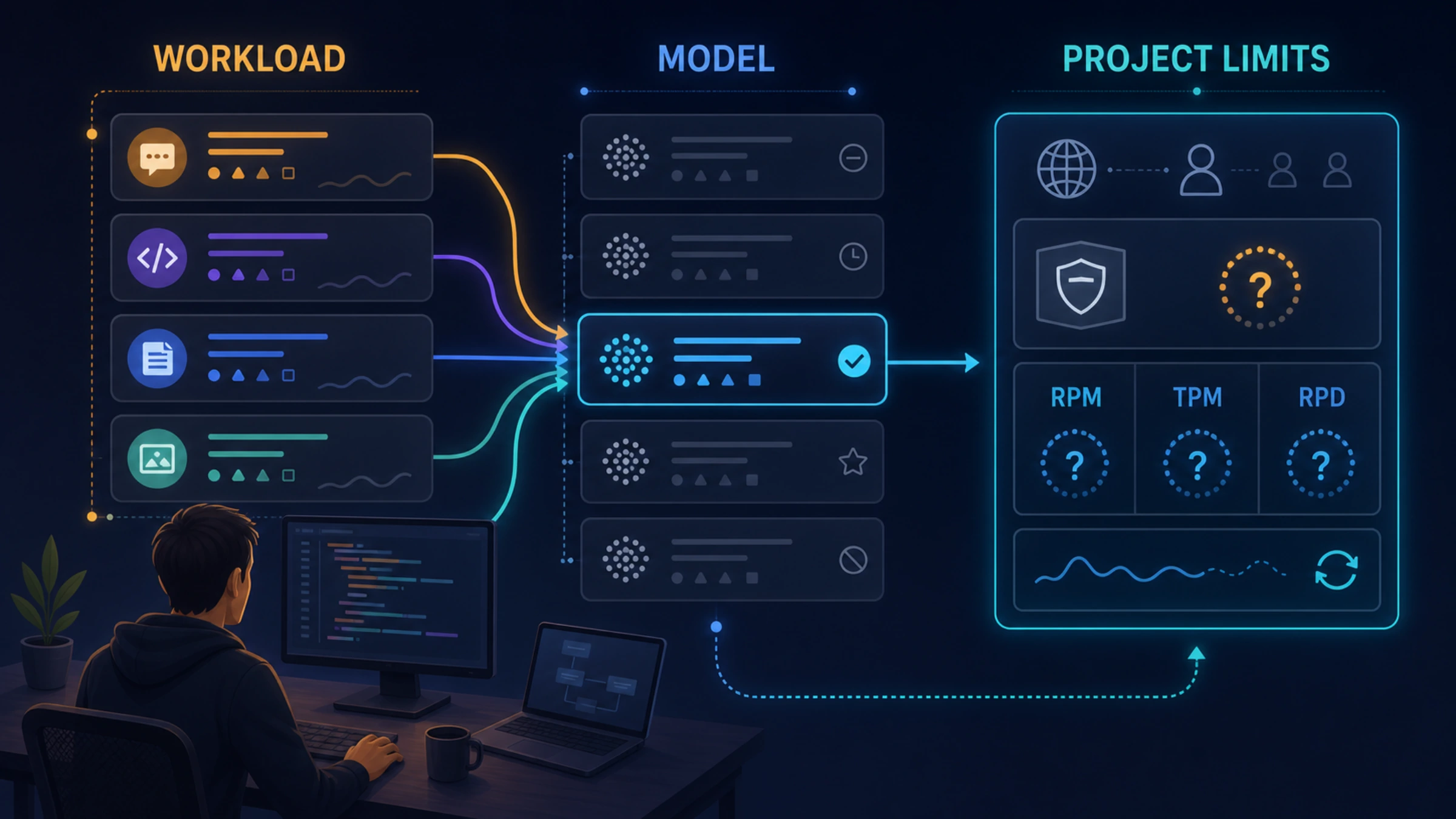
Gemini API rate limits are commonly measured across several dimensions:
- RPM: requests per minute
- Input TPM: input tokens per minute
- RPD: requests per day
Some endpoints add other dimensions, such as images per minute or tokens per day. Hitting any applicable dimension can stop the workload even when the others still have room.
The quota belongs to the Google Cloud project, not to each API key. Creating more keys inside one project does not create more independent Free Tier pools. Daily request quotas reset at midnight Pacific time, which may fall on a different calendar day where you live.
Most importantly, there is no responsible universal quota number to copy into your architecture. Google says specified limits are not guaranteed, actual capacity can vary, and preview or experimental models may be more restricted. The exact RPM, TPM, RPD, token-per-day, and concurrency limits for your project are unknown until you inspect that project.
Verify your project in five minutes
Before writing application logic around a free model:
- Open Google AI Studio and select the same project your API key uses.
- Check the project's billing status and effective usage tier. New accounts begin on the Free Tier, but the selected project determines the tier.
- Open the project's Rate Limits view and record the exact model ID plus every displayed limit—not only RPM.
- Cross-check the endpoint on the current Gemini API pricing page and model catalog.
- Run a small representative workload and handle quota errors explicitly. Recheck before a launch, load test, or model migration.
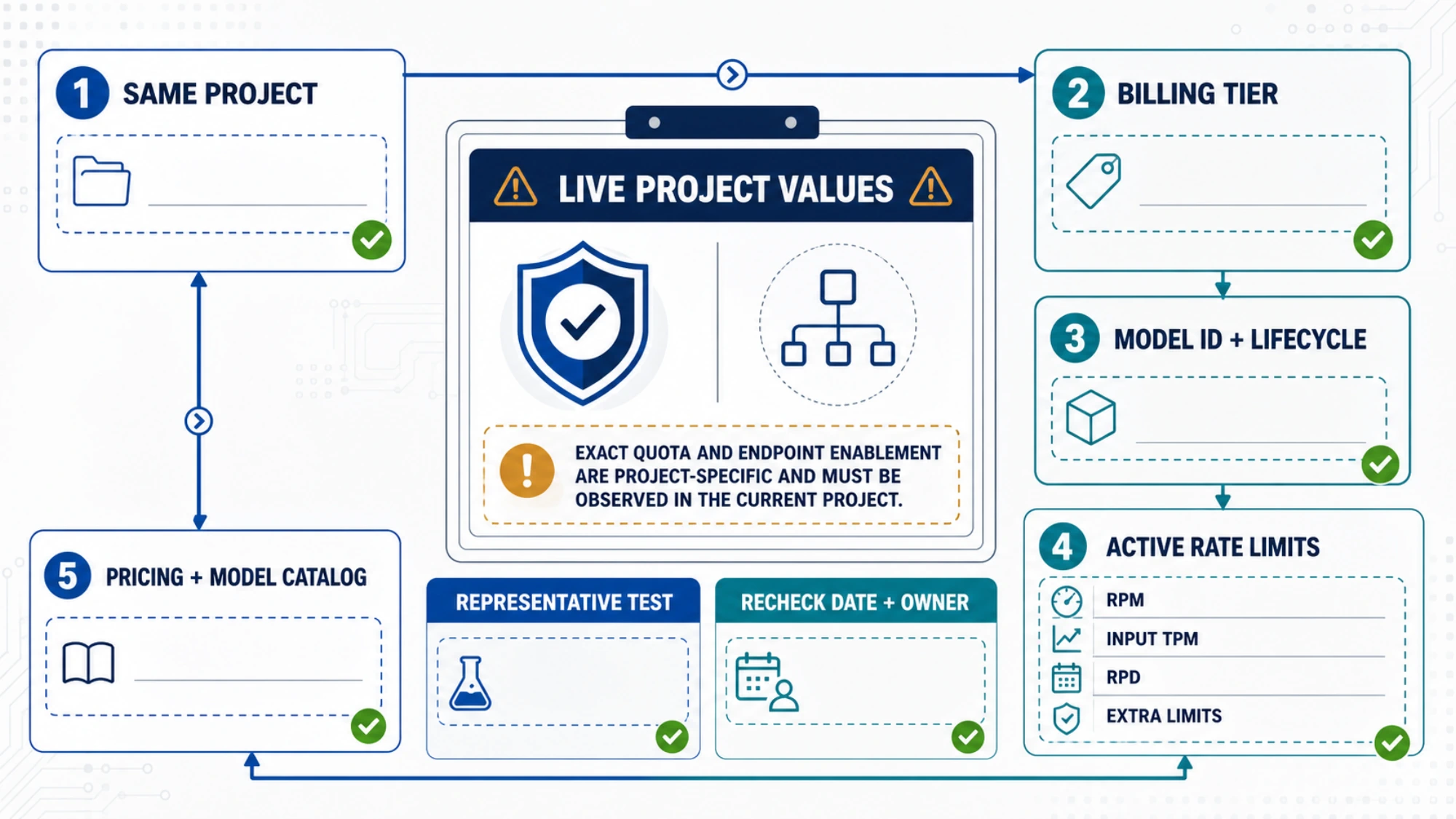
A useful project note is simple: endpoint ID, lifecycle label, billing tier, observed RPM/TPM/RPD, any extra dimensions, check date, and the person responsible for rechecking. That turns an ephemeral dashboard value into an auditable engineering decision without pretending it is permanent.
Free tokens do not mean every feature is free
The pricing matrix can show $0 standard token input and output while a particular processing mode, tool, or media feature is unavailable or priced separately. Check the row for the exact endpoint and feature you plan to call. Image generation, computer use, TTS variants, live audio, grounding, caching, and batch processing should never inherit the base model's “free” label by assumption.
This distinction explains many apparent contradictions: one developer can successfully test a model in AI Studio while another finds no Free Tier API quota for the endpoint or feature they actually need.
The privacy boundary matters before billing does
For Google's Unpaid Services, the current Gemini API Additional Terms say submitted content and generated responses may be used to provide, improve, and develop Google products and machine-learning technologies. Human reviewers may read, annotate, and process API inputs and outputs. Google says not to submit sensitive, confidential, or personal information to Unpaid Services.
For Paid Services, Google states that prompts and responses are not used to improve its products. The terms also give the Paid Services data-use treatment to free-of-charge access in the EEA, Switzerland, and the United Kingdom under the stated regional conditions. Other logging, abuse-prevention, service, and legal terms may still apply.
This is not legal advice. If a prototype touches customer records, private source code, health information, credentials, or regulated data, stop and review the current Gemini API Additional Terms before sending it. Moving to a paid tier may address a key data-use concern, but it does not replace your own security and compliance review.
When to stay free—and when to enable billing
The Free Tier is a sensible fit when you are learning the API, testing prompt behavior with non-sensitive data, or validating a low-volume prototype that can tolerate variable capacity.
Consider Paid Services when you need one or more of the following:
- predictable capacity beyond the project's live free limits;
- an endpoint or mode not offered with free standard input/output;
- production use where preview churn is unacceptable;
- the Paid Services data-use treatment;
- a workload that cannot tolerate quota resets or variable availability.
Billing does not automatically make a preview endpoint stable, and it does not remove the need to inspect model-specific limits. It changes the service tier; it does not erase lifecycle or architecture risk.
Frequently asked questions
Is the Google Gemini API completely free?
No. New accounts begin on a limited Free Tier for selected models. Eligibility, quota, features, and availability depend on the endpoint and project. Other endpoints and higher usage require Paid Services.
Does every Gemini API key get its own free quota?
No. Rate limits apply per project, not per API key. Multiple keys in the same project share the project's quota pool.
Why does a free model return a quota error?
Your project may have reached one limit dimension, the endpoint may not be enabled, or actual capacity may be lower than a published example. Check the live project view in AI Studio and inspect every applicable dimension.
Are Gemini image models on the Free Tier?
Not in the Standard pricing rows reviewed on August 31, 2026. The listed Gemini image endpoints showed free-tier standard input and output as unavailable. Recheck the current pricing page because this status is volatile.
Which free model should I choose first?
For a general prototype, compare the currently free Flash endpoints, then choose one whose current lifecycle and project limits fit your use. Use Flash Lite candidates for a lightweight experiment, gemini-2.5-pro for a reasoning-heavy proof of concept, and specialized audio, embedding, or robotics endpoints only when the workload needs them.
A durable decision rule
Do not save a screenshot of a model list and call the decision finished. Save the exact endpoint, its current lifecycle label, the project's active limits, the pricing check date, and the data-handling decision. Then test with a representative request.
That small record is the difference between “Gemini has a free API” and knowing whether your chosen Gemini endpoint is free, available, and appropriate for your project today.